
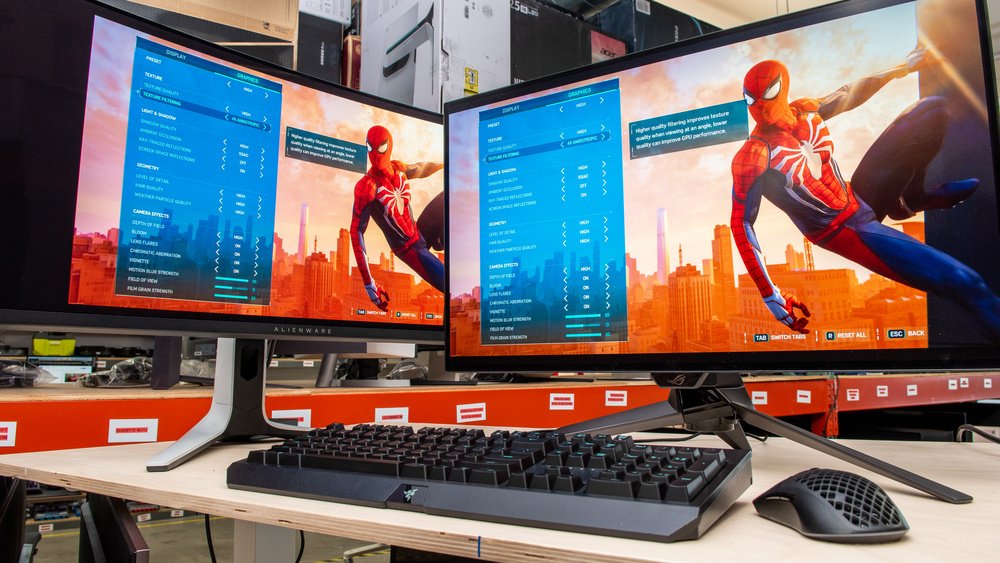
Choosing the correct display not only can transform how a game looks, but it can also transform how it feels. The Best gaming monitors combine sharp resolution, rapid refresh rate and resilient response rate such that each action on the screen does not take long but happens immediately. A lot of consumers just look at price, yet speed and quality of panels can be more of a factor in the daily gameplay. Due to an overwhelming number of choices available in the market today, it may be vital to know what exactly makes a great monitor and an average one apart before you can part ways with your money.
The article is a tour of nine highly rated monitors at various budgets and applications and how to choose a gaming monitor depending on your real setup. Rather than restating spec sheets, every section justifies why a monitor deserves the place it has and who is the best fit.
Why Refresh Rate and Response Time Define Top Gaming Displays
Response time and refresh rate determine the degree to which fast motion onscreen is smooth and sharp, and this is how good fast motion would look on the screen. An increased refresh rate will result in the screen changing more often every second, whereas a decreased response time will result in the pixels changing color more quickly and decreasing blur in sudden motions.
Since these two specs are complementary, comparing a monitor using only one of them would be an inaccurate display of the entire image. Even a 240Hz panel with a slow response time will exhibit ghosting, and a fast response monitor with stuck 60Hz frequency will not feel any smoother. This way is to say that when making choices, invariably look at both numbers and not just one.
Matching Your Graphics Card to the Right Display
Your GPU determines the actual limit of what is capable of being delivered by a monitor, and therefore checking them out first saves you money in case you spend it later. However, the idea of having a 4K monitor with 240Hz is impressive; it remains idle in cases where your graphics card can support 90 frames per second at such a resolution.
Therefore, the more intelligent way to do that is to find out the average frame rate of your GPU in your most played games and then select a monitor with a similar refresh rate, which is approximately the same as your average game.
List of Best Gaming Monitors 2026
| Monitor | Best For | Panel Type | Resolution | Refresh Rate | Response Time |
| MSI MPG 321URX QD-OLED | Overall Performance | QD-OLED | 4K | 240Hz | 0.03ms |
| Asus ROG Strix XG27UCG | Budget 4K Gaming | IPS | 4K / 1080p dual | 160Hz / 320Hz | 1ms |
| MSI MPG 271QRX | High-Speed 1440p | QD-OLED | 1440p | 360Hz | 0.03ms |
| KTC H27T22C-3 | Affordable 1440p | IPS | 1440p | 210Hz | 1ms |
| AOC Gaming C27G4ZXE | Budget 1080p | VA | 1080p | 280Hz | 1ms |
| Gigabyte MO34WQC2 | Ultrawide Gaming | OLED | 3440×1440 | 240Hz | 0.03ms |
| Xiaomi G34WQi | Budget Ultrawide | VA | 3440×1440 | 180Hz | 1ms |
| Samsung Odyssey OLED G9 | Super Ultrawide 32:9 | QD-OLED | 5120×1440 | 240Hz | 0.03ms |
| Alienware AW2725QF | Dual-Mode Flexibility | IPS | 4K / 1080p | 180Hz / 360Hz | 0.5ms |
MSI MPG 321URX QD-OLED Delivers Premium Performance at a Fair Price
This 32-inch QD-OLED panel wins the crown as it delivers the quality of OLED without the sticker price normally charged for this technology. Colors remain vivid, blacks remain dense, and the response time of 0.03ms ensures that fast movement remains crisp rather than blurred.
This is what makes this monitor even more special, as it balances resolution and speed in one. The majority of 4K displays trade sharpness, but this one can run a smooth 240Hz without sacrificing image quality. Nevertheless, brightness may be a little bit more weaker in highly-litened rooms than bright IPS counterparts, which is why it is important to pay attention to the lighting arrangement here.
Asus ROG Strix XG27UCG Offers Real 4K Without OLED Pricing
This dual-mode IPS display ought to attract buyers who desire 4K clarity but who do not wish to spend the OLED dollars. It is native 4K at 160Hz, but can be switched to 1080p at 320Hz when needed, essentially being two monitors in a single panel.
It is particularly attractive to players who play particularly in single-player mode and in ranked competitions regularly. The IPS panel is very color-accurate even without OLED technology, and the pixels are sharp at 27 inches. The 1080p is slightly interlaced, blurring desktop text a notch, but the gameplay is still sharp all the way.
MSI MPG 271QRX Pushes 1440p Speed to Its Limits
This 1440p QD-OLED monitor is worth paying close attention to speed-centrally oriented players, who are not willing to sacrifice the image quality. Its high refresh rate (360Hz) and the identical quick response time as its 4K counterpart make it appeal directly to players who seek to minimize every possible millisecond of input lag.
Due to the fact that it has a high refresh ceiling, using this monitor with a strong GPU will allow it to be used to full potential. This show is at a solid premium price, partially due to high manufacturing cost of OLED, and partially due to lack of substitutes with 360Hz at this resolution. Tighter budget buyers can have an advantage in choosing monitors with 165Hz, as that is already within the advantage of most competitive gaming requirements.
KTC H27T22C-3 Proves Budget Monitors Can Compete Seriously
KTC is not a household name, but such a monitor demonstrates that even smaller brands can compete based on actual performance as opposed to simple brand recognition. It provides a 210Hz refresh rate, fairly precise color adjustment, and 450 nits high brightness, thus in reality surpassing multiple expensive OLED displays on raw brightness performance.
Therefore, this is a truly intelligent choice among buyers who would prefer to have a powerful performance of 1440p without spending as much as OLED. It does not have any additional features such as USB passthrough or a fully adjustable stand, but its performance in the field of core gaming can compete better with larger and better-established brands at a comparable price range.
AOC Gaming C27G4ZXE Brings High-Speed 1080p Gaming on a Budget
Among the best gaming monitors for 1080p resolution, this VA panel stands out mainly because of its impressive 280Hz refresh rate at an affordable price point. Gamers who need to compete and prefer performance to resolution tend to prefer 1080p monitors in any case, as with the lower resolution, the higher frame rates can be achieved with mid-range GPUs.
A little added immersion is provided by its relatively gentle curved form, and VA technology is a little more aggressive in its colour output than what more affordable panels can provide. With that said, there is no such thing as pixel response, and scenes with high motion may contain a bit of ghosting when handling the game. At this price, this trade-off is reasonable and not a true dealbreaker.
Gigabyte MO34WQC2 Adds Cinematic Width Without Sacrificing Speed
Unlike traditional 16:9 displays, ultrawide monitors deliver a more immersive viewing experience. This OLED monitor combines that advantage with a 240Hz refresh rate, making games feel larger and more engaging. Players enjoy better peripheral awareness in competitive shooters, while professionals benefit from the additional horizontal workspace for multitasking.
An inbuilt KVM switch is even more useful as one can connect a laptop and a desktop at the same time without the need to pull out the power cords all the time. It does not do a lot in the way of flashy design as compared to more flashy competitors, but as a whole, its performance makes up for more than the visual simplicity.
Xiaomi G34WQi Makes Ultrawide Gaming Accessible
Not everyone wants to spend premium money just to enjoy ultrawide immersion, and that’s exactly where this Xiaomi model fits perfectly. It offers the same 3440×1440 resolution found on pricier ultrawides, just without OLED technology or extremely high brightness output.
Because of that, it suits casual gamers more than competitive players chasing every visual advantage available. At around $300, it remains one of the more accessible entry points into ultrawide gaming today. The lack of HDR support is a noticeable limitation, but for buyers prioritizing screen space over cutting-edge visuals, this rarely becomes a serious dealbreaker.
Samsung Odyssey OLED G9 Delivers Unmatched Screen Real Estate
This 49-inch display essentially merges two 1440p monitors into a single curved panel, creating an experience few other displays can replicate. Games supporting ultra-wide aspect ratios benefit massively from increased peripheral vision, especially racing and flight simulation titles that reward wider fields of view.
However, not every game supports 32:9 natively, so checking compatibility before buying matters here. Despite its massive size, brightness and HDR performance stay genuinely impressive thanks to OLED technology. The trade-off comes through price, since this sits firmly in premium territory and demands a capable GPU to push frame rates across such a wide canvas.
Alienware AW2725QF Balances Resolution and Speed in One Panel
Dual-mode monitors address a real issue most gamers have: they desire the high resolution and the high refresh rate, but do not necessarily want to have two monitors. This model of the Alienware will alternate between 4K and 180Hz and 1080p and 360Hz, which will provide players with options based on the game they are playing.
Thus, a single player session or a tournament is optimized with a single display. The IPS panel is not inexpensive, in comparison to the competition at equal or lower prices of OLED. Even so the value of someone who truly makes use of both modes regularly would warrant the cost of purchasing two separate monitors.
Choosing Between IPS, VA, and OLED Panel Technology
Most consumers initially overlook how strongly panel type affects color accuracy, contrast, viewing angles, and overall price. These fundamental differences help you to arrive at a better picture of the whole decision-making process before you indulge in buying.
- The IPS panels can provide the most accurate color quality and broad viewing facilities, so they are perfect in terms of content creation and gaming.
- VA panels offer stronger contrast than IPS at a lower price point, though response times tend to lag slightly behind.
- OLED panels provide the fastest response times and deepest blacks available, but they cost more and carry some burn-in risk over years of static-image use.
Due to the various priorities of each type of panel, there is no single choice that fits all. Rather, the correct decision is solely based on the type of factors for which color accuracy or contrast is more important, and whether you play games with the raw speed.
Understanding HDR Before You Trust the Label
HDR sounds impressive on paper but it is not present on all the monitors in actual gameplay. A lot of cheaper screens offer HDR support when such displays do not have the luminance to bring any discernible difference. Therefore, prior to claiming that HDR can bring real value, it is vital to consider real peak Brightness values.
Typically, displays require a minimum of 400 nits to provide fundamental HDR capabilities with colors truly making a difference coming near 1,000 nits of brightness. The consumers who need the realistic HDR images to be required should focus on the OLED or high-quality IPS panels but not on the printed HDR on the box.
Mistakes Buyers Often Make While Shopping for Monitors
Even experienced gamers fall into predictable traps when shopping for a new display. Avoiding these common mistakes saves both money and post-purchase regret down the line.
- Buying a 4K monitor without checking whether the GPU can actually push high frame rates at that resolution.
- Assuming higher refresh rate always means a better gaming experience, even when the GPU can’t keep pace.
- Ignoring panel type differences and judging monitors purely by resolution and price tag.
- Overlooking ergonomics like stand adjustability, which affects comfort during long gaming sessions.
- Trusting HDR labels without verifying actual peak brightness specifications first.
Where Gaming Monitor Technology Is Heading Next
OLED technology is still in transition as a high-end niche to a lower-end middle-cost, and prices are slowly acting on the change throughout the market. Dual-mode monitors are also finding favor, as gamers are more and more desiring flexibility rather than investing in defining themselves as either a specific resolution- refresh compromise in the long run.
At the same time, HDR at the operating system level continues to get better, and gradually the inconsistency that has frustrated buyers over the years is becoming less and less. With costs of making panels further falling, more affordable options of OLED should appear in the 1080p and 1440p categories, in particular. Competitive gamers are the greatest beneficiaries of this change, as shortening the response times will be affordable without the need to spend big.
Final Thoughts on Picking Your Next Gaming Display
Choosing among the best gaming monitors isn’t about picking whatever sits at the top of a generic ranking list. It comes down to matching resolution, refresh and panel type with your real GPU power and your own gaming preferences. A 1440p OLED display could be a rub in the wrong face of a person with a low-end graphics card, and a 1080p low-cost display could be infuriating to a person who wants to see a movie on the big screen.
Learning to select a gaming monitor correctly would involve forgetting the sales blurb and considering what actually enhances your everyday gaming pleasure. As soon as that priority becomes evident, there are a lot fewer options to display that you can narrow down to, and you will be spending money on something that suits how you play.
Read More Blogs: Best Gaming Mouse in 2026: Top Picks Tested for Every Gamer
